
.jpg)





Introduction
What Is VBScript? Uses, Examples, Features, and AlternativesVBScript, short for Visual Basic Scripting Edition, is a lightweight scripting language developed by Microsoft. It was designed to automate tasks, handle basic programming operations, and add scripting functionality to supported Windows app...
Full Details
What Is VBScript? Uses, Examples, Features, and Alternatives
VBScript, short for Visual Basic Scripting Edition, is a lightweight scripting language developed by Microsoft. It was designed to automate tasks, handle basic programming operations, and add scripting functionality to supported Windows applications and environments.
For many years, VBScript was used for Windows administration, legacy web applications, Windows Script Host automation, and automated testing. Although modern technologies have replaced it in many areas, VBScript remains relevant when maintaining older applications and understanding legacy Windows systems.
In this guide, you will learn what VBScript is, how it works, its main features, practical examples, advantages, limitations, and the modern alternatives worth considering.
What Is VBScript?
VBScript is a scripting language based on Microsoft's Visual Basic programming language. It uses a relatively simple syntax that makes it suitable for writing small scripts to automate repetitive tasks.
Unlike a full application development language, VBScript was primarily intended for scripting within compatible host environments. These included Windows Script Host and older versions of Internet Explorer.
VBScript scripts commonly use the .vbs file extension when saved as standalone script files.
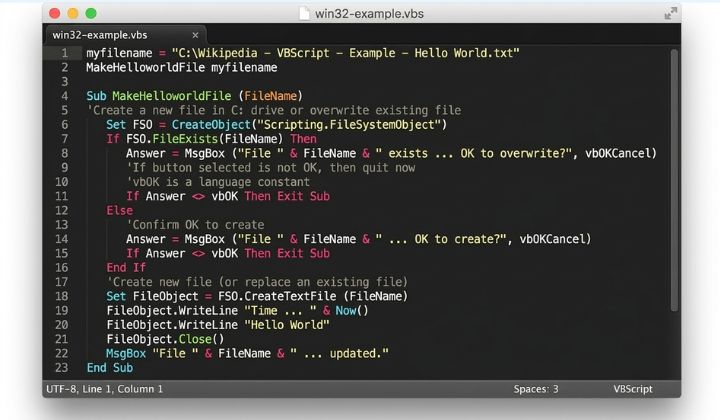
For example, a basic VBScript program can display a message:
MsgBox "Hello, World!"When executed in a compatible Windows scripting environment, this script displays a message box containing the text "Hello, World!"
What Is VBScript Used For?
VBScript has been used in several areas of software development and Windows administration.
1. Windows Task Automation
VBScript can automate repetitive operations in supported Windows environments. Examples include launching applications, displaying notifications, and performing file operations.
2. Windows System Administration
System administrators have used VBScript to perform administrative tasks, collect system information, and manage certain Windows components.
3. Legacy Web Development
VBScript was historically supported by Internet Explorer for client-side scripting. Developers could use it to handle user interactions and manipulate page content in older web applications.
However, VBScript is not supported as a general-purpose client-side scripting language in modern browsers.
4. Automated Testing
VBScript was used by some legacy testing tools and automation frameworks, including older versions of testing software.
Organizations maintaining these systems may still encounter VBScript in existing test scripts.
5. Working With Older Applications
Businesses sometimes maintain older applications that depend on VBScript. Understanding the language can help developers troubleshoot existing code and plan migrations to modern technologies.
Key Features of VBScript
VBScript offers several features that made it useful for lightweight scripting.
Simple syntax: Its syntax is relatively easy to understand for beginners familiar with BASIC-style programming.
Variables: Scripts can store and manipulate values.
Conditional statements:
If...Then...Elsestatements allow scripts to make decisions.Loops: Statements such as
For...NextandDo...Loopsupport repetitive operations.Procedures: Subroutines and functions help organize reusable code.
Automation support: Compatible host environments can expose objects that scripts use to interact with the operating system or applications.
The availability of specific functionality depends on the scripting host, Windows version, permissions, and installed components.
VBScript Examples for Beginners
The following examples demonstrate basic VBScript syntax. Run them only in a compatible environment.
Example 1: Display a Message
MsgBox "Welcome to VBScript!"This script displays a message box with a welcome message.
Example 2: Store and Display a Variable
Dim userName

userName = "Alex"

MsgBox "Hello, " & userName
The Dim statement declares a variable. The script stores a name in the variable and combines it with a greeting.
Example 3: Use an If Statement
Dim age

age = 20

If age >= 18 Then
    MsgBox "You are an adult."
Else
    MsgBox "You are under 18."
End If
This example demonstrates how VBScript evaluates a condition and displays a different message depending on the result.
Example 4: Use a For Loop
Dim i

For i = 1 To 5
    MsgBox "Number: " & i
Next
The loop repeats five times and displays each number in a message box.
These examples introduce fundamental programming concepts that are useful when reading or maintaining existing VBScript code.
Advantages of VBScript
VBScript has several advantages in environments where it is still supported.
Easy to learn: Its straightforward syntax makes simple scripts relatively easy to read.
Useful for legacy systems: Developers can maintain older applications without immediately rewriting every existing script.
Lightweight scripting: Small scripts can automate particular tasks without requiring a large application framework.
Windows automation history: VBScript has a long history of integration with Windows scripting hosts and certain Microsoft technologies.
Limitations of VBScript
Despite its historical usefulness, VBScript has significant limitations.
Limited modern browser support: Modern web development relies on JavaScript rather than VBScript for client-side scripting.
Legacy technology: New projects generally benefit from modern, actively supported languages and tools.
Platform dependence: Many VBScript use cases depend on Windows-specific scripting hosts and components.
Security considerations: Scripts can perform actions with the permissions of the account running them. Unknown scripts should never be executed without reviewing their source and understanding their effects.
Migration requirements: Organizations with VBScript-based workflows may need to rewrite scripts to maintain compatibility with newer systems.
Is VBScript Still Supported?
Microsoft announced the deprecation of VBScript in Windows, with a phased removal plan. VBScript is no longer a suitable choice for most new development projects, and its availability depends on the Windows release and deployment stage.
Organizations should consult Microsoft's current Windows documentation before relying on VBScript for production systems.
For new automation projects, PowerShell or Python may be more appropriate choices, depending on the task.
VBScript vs. JavaScript vs. PowerShell
These technologies serve different purposes, so the best choice depends on your requirements.
VBScript
VBScript is primarily relevant to legacy Windows scripting and older applications that depend on it.
JavaScript
JavaScript is widely used for interactive websites, frontend development, backend services, and cross-platform applications.
PowerShell
PowerShell is designed for system administration, configuration management, and automation, particularly within Windows environments. It also supports cross-platform use.
For modern Windows administration, PowerShell is usually a better starting point than VBScript. For browser-based applications, JavaScript is the standard choice.
How to Learn VBScript
If you need to understand VBScript for an existing project, follow these steps:
Learn variables, data types, and basic expressions.
Practice conditional statements and loops.
Understand procedures and functions.
Explore the scripting host used by your application.
Review file, system, and application automation examples.
Test scripts in a safe environment before using them on important systems.
Consider migrating important workflows to a supported alternative.
Beginners learning programming from scratch may prefer to start with Python, JavaScript, or PowerShell, depending on their goals.
Frequently Asked Questions
What does VBScript stand for?
VBScript stands for Visual Basic Scripting Edition.
Is VBScript a programming language?
VBScript is a scripting language based on Visual Basic. It is used to write scripts that perform operations within compatible host environments.
What file extension does VBScript use?
Standalone VBScript files commonly use the .vbs file extension.
Can VBScript run in modern web browsers?
VBScript is not supported as a general-purpose scripting language in modern browsers. JavaScript is the standard language for client-side web development.
Is VBScript good for beginners?
VBScript has a relatively simple syntax, but it is primarily a legacy technology. Beginners choosing a language for future projects may benefit more from learning Python, JavaScript, or PowerShell.
What is the best alternative to VBScript?
PowerShell is often suitable for Windows administration and automation. Python is useful for general-purpose automation, while JavaScript is ideal for web development. The best choice depends on the specific task.
Can VBScript automate Windows tasks?
Yes, in compatible Windows environments, VBScript has historically been used to automate certain tasks. Availability and functionality depend on the Windows version, scripting host, and system configuration.
Conclusion
VBScript played an important role in Windows automation, legacy web development, and older enterprise applications. Its simple syntax and scripting capabilities made it useful for many everyday tasks.
Today, however, its legacy status and changing Windows support make it a less practical choice for new projects. Developers maintaining older systems can benefit from understanding VBScript, while those starting new projects should evaluate modern alternatives such as PowerShell, Python, and JavaScript.
Choosing the right scripting language helps improve compatibility, maintainability, and long-term support for your software projects.